Write and run in one window.
Set up your compile and run commands, then use the buttons to run them. See the results directly below your code.
A SMALL EDITOR. A FIRST STEP.
Write code, run it, and see the results.
TurtleEdit is a simple
text editor for
programming beginners and their teachers.
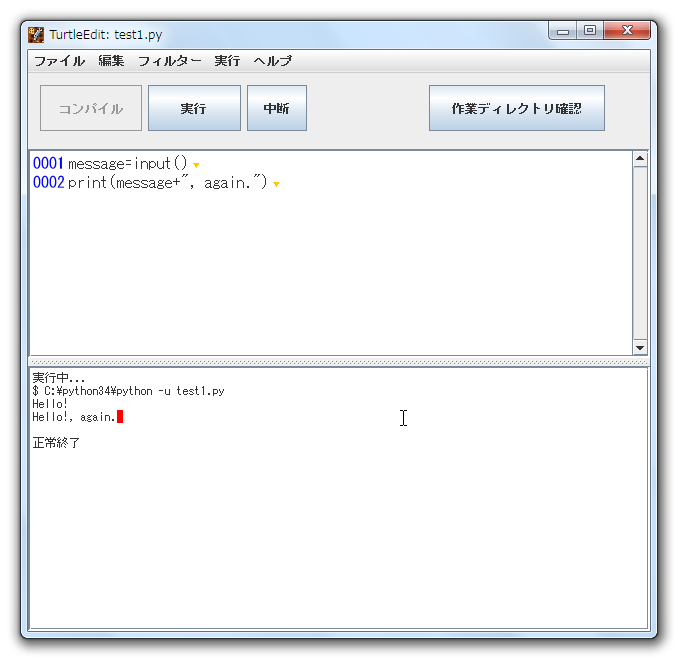
Simple tools to help you get started.
WHY TURTLEEDIT
Spend less time learning the tools.
Spend more time learning to
code.
Set up your compile and run commands, then use the buttons to run them. See the results directly below your code.
Line numbers are always visible, and multibyte characters are marked to help you spot mistakes. TurtleEdit warns you about spaces in filenames and prompts you to save before compiling.
Configure commands for C, Python, Ruby, and other languages. Practice searching, replacing, and filtering text with regular expressions.
DOWNLOAD
Choose the package for your computer. You will also need a Java 17 runtime or later.
GETTING STARTED
Download the ZIP package for your computer and extract it to a folder of your choice.
On Windows or macOS, double-click the application icon. To start the JAR version, run this command in a terminal:
java -jar TurtleEdit.jarOpen Run → Settings and enter the commands for your language. Write and save a program, then try compiling and running it.
GUIDES & RESOURCES
From basic editing to setting up your programming environment.
These guides reflect the software versions available when they were written. Screens and instructions may differ from those in current versions. Most setup guides are in Japanese.
FROM THE CLASSROOM
Compiling before saving. Working in the wrong folder. Overlooking a full-width space in the code. TurtleEdit grew out of a desire to help students avoid these common stumbling blocks in university programming classes.
TurtleEdit was written for introductory programming courses at Tohoku University. Its simple interface helps beginners focus on their code. Line numbers, marked multibyte characters, filename checks, reminders to save before compiling, and a button to check the working directory help students avoid common mistakes.
The editor was written in Java using NetBeans. Teachers and learners familiar with these tools can modify it to suit their needs.
2018-07-09 — Added interpreter mode in settings.
2017-03-03 — Added code signing to the Mac application.
2016-07-25 — Made the Break button more reliable.
2016-07-22 — Added matching-parenthesis indicators.
2016-07-21 — Fixed tab stop positions and added visual guides.
The MIT License

Copyright 2013-2016 Yoshinori Hayakawa <hayakawa@cite.tohoku.ac.jp>.

Permission is hereby granted, free of charge, to any person obtaining a copy
of this software and associated documentation files (the "Software"), to deal
in the Software without restriction, including without limitation the rights
to use, copy, modify, merge, publish, distribute, sublicense, and/or sell
copies of the Software, and to permit persons to whom the Software is
furnished to do so, subject to the following conditions:

The above copyright notice and this permission notice shall be included in
all copies or substantial portions of the Software.

THE SOFTWARE IS PROVIDED "AS IS", WITHOUT WARRANTY OF ANY KIND, EXPRESS OR
IMPLIED, INCLUDING BUT NOT LIMITED TO THE WARRANTIES OF MERCHANTABILITY,
FITNESS FOR A PARTICULAR PURPOSE AND NONINFRINGEMENT. IN NO EVENT SHALL THE
AUTHORS OR COPYRIGHT HOLDERS BE LIABLE FOR ANY CLAIM, DAMAGES OR OTHER
LIABILITY, WHETHER IN AN ACTION OF CONTRACT, TORT OR OTHERWISE, ARISING FROM,
OUT OF OR IN CONNECTION WITH THE SOFTWARE OR THE USE OR OTHER DEALINGS IN
THE SOFTWARE.